










Ejyalo - Nepal’s No.1 Rent Management App
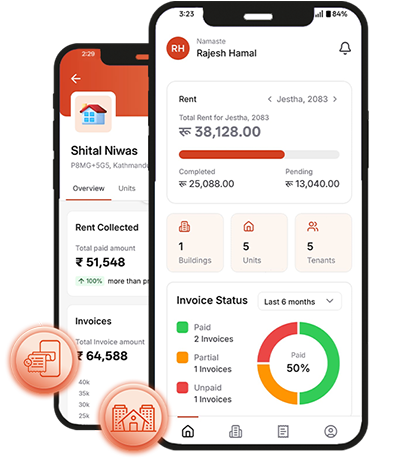
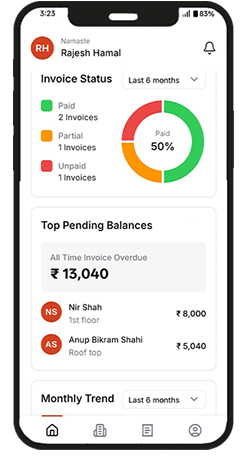
Ejyalo is an app that focuses on managing issues related to rent & utility billing and payments in Nepal. It helps landlords, tenants, showrooms, and lavish homeowners in tracking of electricity consumption, bills, and payment status.
To make maximum use of this app, the users (mostly landlords and tenants) have to install the app on their phone as well as fit Ejyalo’s Smart Metering Device in their meter box. With a fully automated system (device plus app), the users can feel the difference in comfort, timeliness, and accuracy.
OUR CUSTOMERS
Ejyalo’s seamless handling of rental & electricity bills, and
smart home features has kept all the customers happy and satisfied.





OUR SERVICES

ENTERPRISE MANAGEMENT
Understand, monitor, and manage the electricity usage in factories and exclusive showrooms.
-
Safe and Secure
-
Alarms and Alerts
-
Detailed Reports
-
Real-time Data
RENTAL MANAGEMENT
Easily track, manage, and record your tenants' rent and utility payments in one place.
-
Tailored for landlords
-
Add Rooms, flats, and tenants
-
Detailed Records
-
Alerts and Reminders
SMART HOMES
Ejyalo offers full-fledged control over the lights in each room or part of the luxury smart homes.
-
Smart Lighting
-
Remote Control
-
Precise Switch Status
-
Easy Billing
Not sure what to choose ? contact us for custom packages
What our customer say
“
After reviewing consumption reports generated by Ejyalo smart meters, we were able to cut down our electricity bill by 40%. Ejyalo is truly a saviour for us.
”
KAFF Nepal
Showroom“
Ejyalo is helping us track the exact electricity consumption of each machine at every stage in our manufacturing industry, enabling us to make smarter decisions in our production process.
”
Annapurna Winding Wires
Manufacturing Industry“
With Ejyalo, we no longer have to stress about visiting each tenant for bill sharing and rent collection; rental bills are sent automatically via SMS, and payments are done online. Truly best app for rent management in Nepal.
”
Maharjan Complex
Commercial Building2578
TOTAL USER REVIEWS
FAQ - Frequently Asked Questions
Basic
Company
Ejyalo app
Ejyalo is Nepal's first and most widely used digital property management platform, serving landlords across Kathmandu, Pokhara, Lalitpur, Biratnagar, and all major cities in Nepal. Available on iOS, Android, and web with NPR support via Khalti and eSewa.
Ejyalo natively supports Nepali Rupee (NPR) and integrates with Khalti - one of Nepal's leading digital payment platforms - for online rent and utility bill collection.
Ejyalo is a rent and utility bill management application that is useful to track electricity consumption, bills, and payment statuses. It is designed for landlords, tenants, property managers, and lavish smart homes.
Ejyalo automates the full utility billing cycle - calculation, distribution, collection, and reporting - all in Nepali Rupees (NPR), with Khalti and eSewa payment integration. Used by property owners across Nepal to manage electricity, water, and internet bills per unit.
Step 1 Create a building and units: Landlord creates a building and then adds multiple units to the building based on real rooms available in his building.
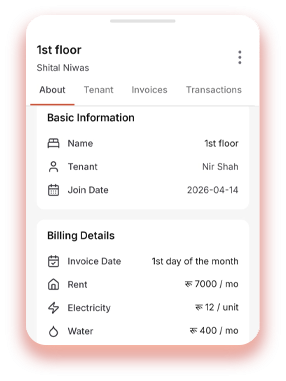
When adding a building landlord has to fill a form where price of electricity per unit is set e.g. Nrs. 14 per unit (Electricity price for any unit for a given building is same)
Likewise provide rent price of the unit per month e.g. Nrs. 10000 per month (Rent for any unit for a given building could vary)
Step 2 Add Tenants: Landlord adds a tenant to the building the tenant is living at. Phone number is required.
Step 3 Assign Tenant to respective unit/s : Once the building, unit and tenant are added, then the landlord assigns the tenant to one of the units of its building.
Phone number of the tenant will be used for communication and bill sharing
At a specific date accepted by both parties a receipt will be created automatically and sent to the tenant
If required landlord can create receipts manually for specific dates and send it to the tenant
Tenant can pay the bill via khalti or cash which then the landlord adds to the system against the receipt
Ejyalo is Nepal's first digital rent management system, built NPR-first for Nepali landlords and tenants. It automates rent and utility billing on a fixed date each month, delivers itemized receipts by SMS and email, and collects payments through Khalti or recorded cash. Available on iOS, Android, and the web across Kathmandu, Lalitpur, Pokhara, Biratnagar, and other cities.
Ejyalo automates the process of calculating rent and utility bills on a fixed date. Further, the pre-existing payments can also be added.
Yes - Ejyalo is built to manage multiple properties and units from a single account, with rent and utility billing tracked separately for each one.
Yes, you can use a free version of the Ejyalo app. For demo purposes, you can request a free demo.
Ejyalo is now available on iOS, Android, and in a web application.
Fair utility charges are based on actual usage or a clearly agreed formula, at a rate known in advance, with the calculation visible on every bill. Ejyalo itemizes electricity, water, internet, and garbage charges per unit and shows the full breakdown (readings, rate, carried dues) on each receipt, which removes most billing disputes.
Ejyalo was founded in 2023; however, the market research started in early 2019.
Ejyalo prioritizes the security and privacy of user data. For detailed information, please check our privacy policy.
Yes, Ejyalo offers real-time billing, notifications, and alerts to users via SMS.
In case of late payments, Ejyalo sends a notification to the tenant as well as the landlord. In extreme cases, landlords can decide to cut off electricity to the unit or even add penalty charges on payment due
Yes, Ejyalo provides 24/7 customer support to assist users with troubleshooting or inquiries.
A unit is a room, a flat, or a space that is rented to a tenant.
Once you have buildings listed on the property tab, click the building you want to remove units for.
Click the unit you want to remove.
Click the three vertical dots at the top right of the new tab, click "Delete Unit," then click Delete to confirm.
Simply download the Ejyalo app
Click on Create Account
Provide Mobile Number and verify OTP
Create password and provide your name
Once you have buildings listed on the property tab, click the building you want to add units for.
Click the Units tab, where you'll see a plus sign - click it.
Provide the Unit Code, which helps you identify the unit easily later.
Provide the rent for that unit - by default it matches the building's rent; change it here if this unit is different.
The electricity price per unit is set for the whole building, so it can't be changed here.
Click Add Unit.
Click on the building that you wish to add a tenant for and go to “Tenants tab”
Click on “Invite Tenant”
Provide Phone Number, Full Name and the Date to start billing from
Once you have created your account successfully. Simply click on Add New Property from Home/Dashboard
Provide Building Name and Number of units in the building
Provide rent price and electricity price per unit
Ejyalo has a wallet system: if a tenant pays more than required, the extra amount is stored in their wallet and applied to next month's payment. For example, if a tenant pays NPR 10,000 against a NPR 5,000 receipt, the extra NPR 5,000 is stored in the wallet.
Likewise, if a tenant underpays, the remaining due amount is automatically carried forward to the next receipt.
First Make sure you have added the tenant that you wish to assign to a unit
Click on building, go to units tab and click on the unit that you wish to assign the tenant at
Go to tenant in the new interface and click on “Assign Tenant”
Click on the name of the tenant you require and then next
Click on Assign tenant after providing rent per month, electricity used and reported date of the usage
Click on the building that you wish to see previous units for and go to Units tab
Click on the three horizontal lines beside the Search bar
On the new form click on “Archived” and select date if required then apply
Set an agreed rate per unit (kWh), for example NPR 14 per unit, read each unit's meter on the same date every month, and charge (current reading - previous reading) × rate. Ejyalo automates this: enter the current reading and the itemized bill is calculated and sent to the tenant automatically; with Ejyalo smart meters the reading itself is captured remotely.
Click on the building, go to the Units tab, and click the unit where you want to unassign the tenant.
Go to the Tenant tab, where you'll see the tenant assigned to the unit.
Click the three vertical dots in the top-right corner, click "Unassign Tenant," then confirm by clicking "Unassign."
Go to Invoices tab of the property you want to create an invoice for
Go to Invoices tab and click on “+” sign to create new invoice
Select Tenant and their respective unit and put in current electric unit number
Create Receipt and Click on Share if you want to send it via social media or such
Yes. Ejyalo supports both the English (AD) and Bikram Sambat (BS) calendars. While many users use the AD calendar to manage schedules and reminders, you can choose the BS calendar for rent and utility billing if it better matches your rental agreements or day-to-day operations. This provides greater flexibility and makes billing more convenient for landlords and property managers in Nepal.
After you login. Click on History on the bottom menu tab showcasing all previous receipts and due amounts as well
Tenants can pay online via Khalti, or in cash, which the landlord then records against the receipt in the app.
Yes - a single tenant can be assigned to multiple units, with billing tracked separately for each one.
Once you are logged in, click on Account from the bottom menu tab
Click on Plan and Subscription to view plan subscribed in detail
Once you are logged in, click on Account from the bottom menu tab
Then click on Help & Support -> Contact Us
For any sales and subscription related queries select Sales
For any questions regarding system and software or you face any issue when using the system click on Technical Support
Yes - each building requires its own tenant profile for that tenant, even if it's the same person renting units in multiple buildings.
No - each unit can only be assigned to one tenant at a time, to keep billing and payment tracking unambiguous.
Please refer to our subscription tier or contact support
Affordable and we do have schemes that can help you make use of smart meters or even own it. Contact support for further information.
Feature soon to be released
Own a cool smart meter and work smarter
Get instant meter readings from anywhere and anytime
Forgot to turn off your heavy machinery such as A/C or your tenant has a ton amount of money to be paid? Simply, turn the electricity to the unit off from the app
Track Leakage: You did not use a lot of machinery this month but the bill is still the same? Easily track leakage if any machinery is using the electricity even when switched off
Please refer to our subscription tier list for more info
If you want to add more units/buildings than your limit then you will need to upgrade your subscription. Contact support or up your subscription via app
Likewise, if you hit your limit for number of receipts or transactions please do contact support for further assistance
Contact Support
You don't need the smart metering device to use Ejyalo - you can enter electricity readings manually each billing cycle and Ejyalo will calculate the bill automatically. Smart meters simply automate the reading itself, so you don't have to record it by hand.